
LINUX配置双机SSH信认,并用public key认证登录
Linux Server1:192.168.1.104
Linux Server2:192.168.1.105
终端:SSH Secure Shell Client
1.用password方式登录Linux Server1和2


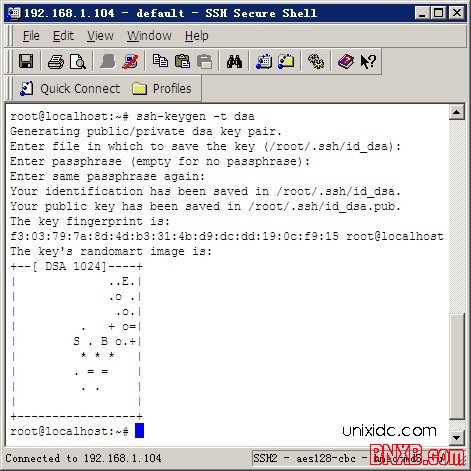
2.在Linux Server1上命令操作如下:
#ssh-keygen -t dsa
并三次回车
#cd .ssh/
#cp id_dsa.pub authorized_keys
#chmod 600 authorized_keys
#scp * 192.168.1.105:/root/.ssh
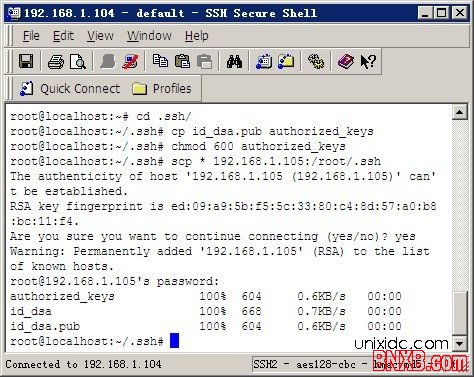
其中在scp的时候 会提示Are you sure you want to continue connecting (yes/no)?
确定输入yes进行确认,之后会提示[email protected]’s password: 要求输入root密码
我们在Linux Server1(192.168.1.104)上ssh连接Linux Server2(192.168.1.105),看下是否正常
#ssh 192.168.1.105
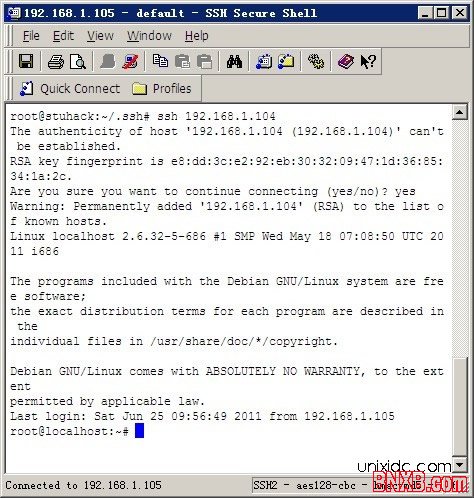
然后在Linux Server2(192.168.1.105)上ssh连接Linux Server1(192.168.1.104),看下是否正常
如果提示:Are you sure you want to continue connecting (yes/no)? 输入yes即可
到目前为止 已经配置好Linux Server1和Linux Server2的SSH互相信任,SSH连接并不需要密码
3.打开SSH Secure Shell Client>Edit->settings->Keys>Generate New



选择DSA 2048


- 最新评论