
centos/ubuntu如何开启curl命令对HTTP2.0的支持方法 编译升级CURL开启对HTTP2支持
centos/ubuntu curl命令开启对HTTP2.0的支持的方法
现在使用 HTTP2 的网站越来越多,技术也越来越成熟,我们经常需要用到CURL去查询一个支持HTTP2.0技术的网站是的HEADER状态,这个时候就需要开启CURL的HTTP2支持了
而如何启用 curl 命令 HTTP 2 支持呢?这里教你如何操作。
我们直接使用 curl 去请求一个 https 页面时,默认可以看到其返回的是 HTTP1.1 的header response如下所示:
curl -I https://nghttp2.org/
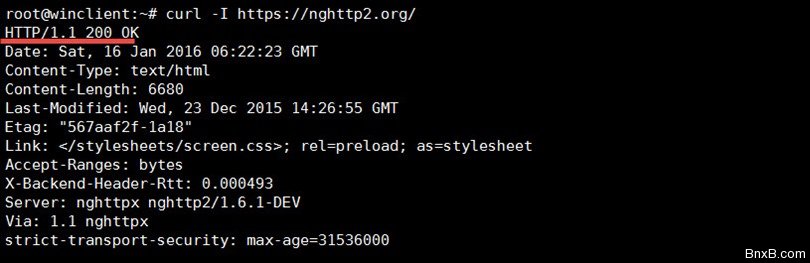
当我们试图带上 http2 参数时,会返回一个未支持协议的「curl: (1) Unsupported protocol」错误:
curl --http2 -I https://nghttp2.org/

使用如下命令我们可以看到 curl 版本:
curl --version
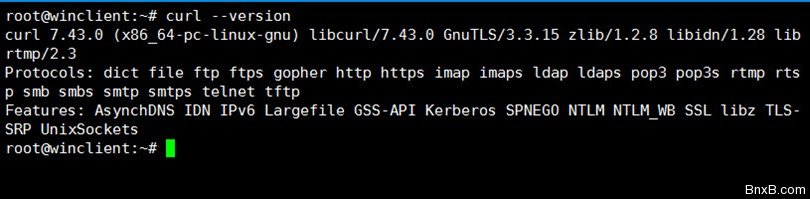
从上图中,我们可以看到当前 curl 的版本及支持的协议以及功能特性没有支持 HTTP2。
启用curl命令HTTP2支持
编译安装nghttp2 Ubuntu下
为了让 curl 支持 HTTP2 我们需要安装 nghttp2(http2 的 C 语言库):
#安装编译工具等
sudo apt-get install git g++ make binutils autoconf automake autotools-dev libtool pkg-config
  zlib1g-dev libcunit1-dev libssl-dev libxml2-dev libev-dev libevent-dev libjansson-dev
  libjemalloc-dev cython python3-dev python-setuptools


#编译安装nghttp2
git clone https://github.com/tatsuhiro-t/nghttp2.git
cd nghttp2
autoreconf -i
automake
autoconf
./configure
make
sudo make install
升级curl版本
cd ~
sudo apt-get build-dep curl

wget http://curl.haxx.se/download/curl-7.46.0.tar.bz2
tar -xvjf curl-7.46.0.tar.bz2
cd curl-7.46.0
./configure --with-nghttp2=/usr/local --with-ssl
sudo make && make install

echo '/usr/local/lib' > /etc/ld.so.conf.d/local.conf
ldconfig
升级完版本之后,我们再查看 curl 版本时会发布特性中会增加 HTTP2 功能支持。此时 –http2 参数就可以正常使用了:
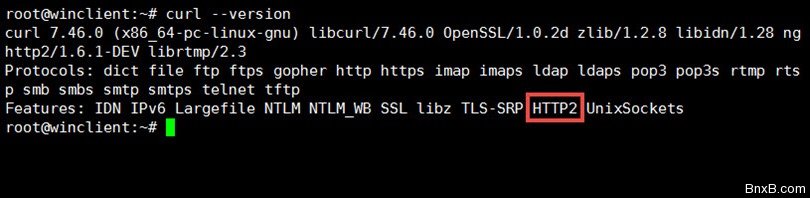
curl --http2 -I https://nghttp2.org
测试curl with http2
我们再使用如下命令测试 笨牛网主页看看:
curl --http2 -I https://www.bnxb.com
返回结果如下:
.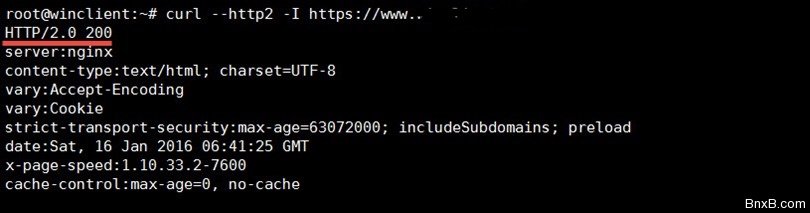
到这里CURL开启HTTP/2的方法以及全部完成
另外在CENTOS下安装方法类似
1、安装nghttp2
先安装nghttp2依赖的环境
yum install install make binutils autoconf automake autotools-dev libtool pkg-config zlib1g-dev libcunit1-dev libssl-dev libxml2-dev libev-dev libevent-dev libjansson-dev libjemalloc-dev cython python3-dev python-setuptools
上面步骤如果遇到错误提示,一般是某个安装包不存在,一般在使用国内yum源的时候会遇到
根据我们安装过程遇到的情况如果有遇到错误,再执行一下下面代码:
yum install zlib-devel openssl-devel libev-devel libevent-devel python-devel python3-devel
wget https://git.gnome.org/browse/libxml2/snapshot/libxml2-2.9.1.zip
unzip libxml2-2.9.1.zip
cd libxml2-2.9.1
./autogen.sh
./configure --help
./configure --enable-shared --with-python=no
make && make install
cd /
再安装nghttp2
wget https://github.com/nghttp2/nghttp2/releases/download/v1.28.0/nghttp2-1.28.0.tar.bz2 -O /tmp/nghttp2.tar.bz2
mkdir -p /tmp/nghttp2
tar -xvjf /tmp/nghttp2.tar.bz2 -C /tmp/nghttp2 --strip-components=1
cd /tmp/nghttp2 && ./configure
make && make install
cd /
如果需要最新版的nghttp2那把第一句替换为
wget https://github.com/nghttp2/nghttp2/releases/download/v1.31.0/nghttp2-1.31.0.tar.bz2
3. 安装curl
wget https://curl.haxx.se/download/curl-7.57.0.tar.bz2
tar -xvjf curl-7.57.0.tar.bz2
cd curl-7.57.0
./configure --with-nghttp2=/usr/local --with-ssl
make && make install
echo '/usr/local/lib' > /etc/ld.so.conf.d/local.conf
ldconfig
如果需要最新的curl-7.58.0那把上面的curl-7.57.0全部换成curl-7.58.0
注意观察一下:上面在./configure --with-nghttp2=/usr/local --with-ssl这一步的输出里面有没有一句
HTTP2 support: enabled (nghttp2)
有才能继续往下make,没有的话,就不能成功
4. 验证
[root@localhost src]# curl --version
curl 7.57.0 (x86_64-pc-linux-gnu) libcurl/7.57.0 OpenSSL/1.0.2k zlib/1.2.7 nghttp2/1.29.0-DEV
Release-Date: 2017-11-29
Protocols: dict file ftp ftps gopher http https imap imaps pop3 pop3s rtsp smb smbs smtp smtps telnet tftp
Features: AsynchDNS IPv6 Largefile NTLM NTLM_WB SSL libz HTTP2 UnixSockets HTTPS-proxy
红色字体说明curl已经支持HTTP2和HTTPS
接下来尝试一下效果
curl -I https://www.bnxb.com/
HTTP/2 200
server: nginx
date: Tue, 12 Dec 2017 15:47:15 GMT
content-type: text/html
content-length: 45497
last-modified: Tue, 12 Dec 2017 09:08:45 GMT
vary: Accept-Encoding
etag: "5a2f9c9d-b1b9"
accept-ranges: bytes
已经显示HTTP/2协议出来了
另外注意:CENTOS下安装,我在腾讯云上测试的时候,按这个步骤安装第一遍的时候没有成功,第二遍安装才成功,重装系统,继续测试还是这个情况,至今不明原因,在国外的搬瓦工上一次成功
- 最新评论